
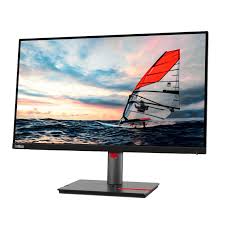
Lenovo ThinkVision P24h-30 23.8″ QHD Monitor
KSh41,999.00
Overview
The Lenovo ThinkVision P24h-30 is a 23.8-inch Quad HD (QHD) monitor designed for professional productivity and multitasking. Featuring an IPS panel, it delivers excellent color accuracy and wide viewing angles. Its robust USB-C docking capabilities provide seamless connectivity, making it ideal for modern off
- Customer Support: If you have any questions regarding your order, please contact our support team at sales@mubaraktechstore.com/0722665209
- For Customers Outside Nairobi, place your orders at sales@mubaraktechstore.com
- Shipping & Delivery: Estimated delivery times vary based on location and shipping method. Tracking information will be provided.
- Contact us for the most up-to-date pricing before ordering.
Overview
The Lenovo ThinkVision P24h-30 is a 23.8-inch Quad HD (QHD) monitor designed for professional productivity and multitasking. Featuring an IPS panel, it delivers excellent color accuracy and wide viewing angles. Its robust USB-C docking capabilities provide seamless connectivity, making it ideal for modern office environments. With support for daisy-chaining multiple displays and full ergonomic adjustments, the P24h-30 offers all-day comfort and versatility, representing a significant upgrade over standard Full HD monitors.
Key Specifications
Category
Details
Display
23.8-inch IPS panel, near-edgeless 3-side design, W-LED backlight, 16:9 aspect ratio
Resolution
2560 × 1440 (QHD), ~123 ppi pixel density
Refresh Rate
60 Hz
Response Time
4 ms (Extreme mode) / 6 ms (Typical mode)
Brightness
300 cd/m²
Contrast Ratio
1000:1 (static) / 3,000,000:1 (dynamic)
Viewing Angles
178° horizontal / 178° vertical
Color Support
16.7 million colors, 99% sRGB, 99% BT.709, 111% sRGB coverage
Connectivity
HDMI 1.4, 2× DisplayPort 1.2 (in/out for daisy chaining), USB-C 3.2 Gen 1 (65W power delivery), USB 3.2 Gen 1 hub (1× upstream, 4× downstream USB-A), RJ-45 Ethernet
Ergonomics
Height adjustable (150 mm), tilt (-5° to 30°), swivel (±45°), pivot (portrait/landscape), VESA 100×100 mm mount
Dimensions & Weight
539.5 × 323.7 × 46.5 mm (without stand), 3.8 kg
Power
Internal power supply, ~27W typical consumption, low blue light and flicker-free
Warranty
3 years
Reviews and User Feedback
Launched in 2023, the P24h-30 is widely praised for its USB-C docking capabilities and suitability for hybrid work setups, averaging ~4.3/5 across multiple retailers.
Staples users highlight it as a “big upgrade for remote workers” with “high-quality visuals” and seamless integration with Lenovo laptops, though one noted a loose power connection (resolved via warranty).
On Reddit (r/Monitors), it’s described as “top-notch value for USB-C docking,” with minimal reports of backlight bleed for the -30 variant.
Amazon reviews mention the “crisp QHD image and easy setup,” with no major connectivity issues.
X posts promote it as a “sleek & sharp” monitor suitable for both work and casual use, praising its ergonomic stand.
Professional review sites like Versus.com rank it highly for color gamut and multitasking, though it’s noted that it is not ideal for high-refresh gaming.
Be the first to review “Lenovo ThinkVision P24h-30 23.8″ QHD Monitor”
Related products

Monitors


Reviews
There are no reviews yet.